Review Comments (0) Screenshots (12) Questions & Answers (0) Votes (0) Awards (1) Wiki  
Word Magic Software
6.3.0.2895
buy.wordmagicsoft.com
Shareware
$595.00  Purchase
282 people
Download Word Magic...

244.38 MBDownloaded 1058 times


Review

This is official description

Forefront technology and the utmost innovative power have merged to create the ultimate Translator, which combines Automatic, context-sensitive translation plus Interactive, User-guided translation.
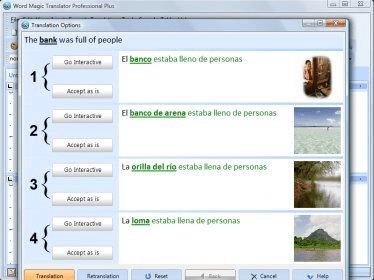
It comprises the following features, which are a definite must-have for any translation task and raise the bar sky-high for any free, not-so-free and/or very expensive translators in the market: images for easier meaning selection, a Translation Options Module using a multiple-choice wizard that lets you choose among all possible variations for your translation.
Voice Recognition for dictation capabilities and Voice Commands that allow you to call out the tasks you need without using mouse or keyboard…these are just a few of the staggering features in this state-of-the-art Translator from Word Magic Software.
 
The following review written by one of the Software Informer contributors applies to version 5.2

For the most demanding users who need an English / Spanish translator, with many add-on modules to enhance its abilities, Professional Plus Edition of Word Magic Translator could be a good choice. This edition is the “big brother” of the series, that includes the Home Edition, Standard Edition and Professional Edition. It is also the most expensive with a price ten times higher than the cheapest choice.

Word Magic Translator Professiona Plus 5.2 has been designed to look alike MS Word so you will be familiar with the interface. Besides, this edition allows a tight integration with Word, so the user will benefit with both programs looking and working similarly. Its main window is divided horizontally into two sections: one section for English and the other for Spanish.
You can either type in the source text to translate or directly open the text file in which you have your source text (all formats supported by MS Word are supported by the translator). Even more, this edition allows opening .PDF files by using a special add-on.

The list of features of the Professional Plus edition is rather long, the longest of the whole family. If you are familiar with the other editions, you can count on that this one includes everything you already know. So let’s focus on what makes this edition “Plus” in comparison with Professional Edition: the most outstanding feature is voice recognition for both English and Spanish. Users can use this feature for dictation avoiding the need of typing in the text, and for program control instead of using mouse and keyboard.

The regular features include spell checking, text pronunciation in both languages including accents (American and British for English and Mexican and Castillian for Spanish), printing feature to print out the text alternating both languages, a huge database of idioms and phrases, and near 20.000 first names in each language.

Word Magic Translator Professional Plus Edition can run under any version of Windows later than Windows 2000 – as any other product in the family - and the system requirements are also the same than those in smaller editions: a Pentium III or equivalent processor and 256 MB of RAM memory.
  • It can work as a resident application at your system tray.
  • It offers a trial for a 14-days period.
  • It supports many add-on modules to enhance its abilities.
  • It includes pronunciation abilities with different accents.
  • It only performs English<->Spanish translations.
  • Its price is ten times higher than Home Edition's.

Reviewed by: Lionel Mira

Reviewer rating:

Reviewed: 2 years ago

What's new in version 6.3

- Unabridged Bilingual Spell Checker
- Approximately 1,300,000 Uninflected (direct) Dictionary Entries
- 50,000 first names, cities and countries in each language, with corresponding gender
- Human-assisted Interactive Editing
- Polysemic Display (with multiple-choice wizard), formerly called "Translation Options"
- Definitions for English and Spanish Words Add-on
- American & Spanish Surnames Add-on
- Reverse Retranslation to Source Language: you can see in your native language whether output is right or wrong
- Revamped Microsoft® Word Plug-in (Up to Microsoft® Office 2010–also available as a standalone product)

What's new in version 5.2

New in version 5.2:

* Prints Source and Translated text alternating sentences (optional)
* Approximately 900,000 Uninflected (direct) Dictionary Entries
* Sweep function for listing not- found words;
it will also include them in the database!
* User-Added Dictionary Printing facility;
it allows you to export words, too!
* User-Added Dictionary: add word-by-word or entire glossaries with one click
* almost 20,000 first names in each language, with corresponding gender
* Additional Surname Spell Checker (US & Spanish)
* Translates to/from International / Mexican / European Spanish
* Translates to/from American / British English
* Voice Recognition for dictation facilities
* Voice Commands for issuing voiced commands instead of Mouse/Keyboard

What's new in version 5.0

Improved Unabridged Bilingual Spell Checker
Works with Tables, Pictures, Headings, Hyperlinks and all types of Formats
Spanish Characters Table

Improved Text Pronunciation
Prints Source and Translated text alternating sentences (optional)
Approximately 900,000 Uninflected (direct) Dictionary Entries
Translation Memory

Improved User-Owned Dictionary: New-specify country of origin for your new entries!
Sweep function for listing not- found words;
it will also include them in the database!
User-Added Dictionary Printing facility;
it allows you to export words, too!
User-Added Dictionary: add word-by-word or entire glossaries with one click
almost 20,000 first names in each language, with corresponding gender
Additional Surname Spell Checker (US & Spanish)
Translates to/from International / Mexican / European Spanish
Translates to/from American / British English
Voice Recognition for dictation facilities
Voice Commands for issuing voiced commands instead of Mouse/Keyboard

Improved Human-assisted Interactive Editing (same as Interactive Mode in former ESI Pro)

New Breakthrough Feature Color Pictures Add-on, to aid you in visually selecting best translation

New Breakthrough Feature Translation Options Module (with multiple-choice wizard)

New Breakthrough Feature True Retranslation to Source Language: you can see in your native language whether output is right or wrong

Improved Revamped MS Word Plug-in (Up to MS Office 2007–also available as a standalone product)
Report a wrong version Report a wrong program title Suggest a correction

Screenshots

Main window Main window Integration with MS Word Integration with MS Word System tray icon System tray icon Initial configuration Initial configuration
All 12 screenshots

Latest comments


There are no comments, be the first one!
Add new comment

E-mail Address:

Password:

Register now »

Forgot password?

Sign in with:
Download Software Informer Client
Copyright © 2012, Informer Technologies, Inc. About| Privacy and terms| Help| Feedback & Support| Partners program